Marketing

Are you ready for 2012?

About this time of year, many people are looking to the next year and thinking about what they can make better.  A slimmer figure and more money in the bank are a couple things that end up on many lists.  Every year people fail to meet their goals set for the New Year.  Here are few reasons why this happens and how you can overcome them:

  1. Too high of an expectation/Setting yourself up for failure.  If you can’t remember the last time you exercised and set a goal of losing 50 lbs by spring or to exercise every single day, you will likely not achieve that goal (unless you are dropping everything to go do it on a reality show).  Same would hold true if you set out to double your income each month.  You will not change your habits overnight.  Jumping into the New Year with such aggressive goals can make you feel like a failure fast.  Start with a smaller goal for January or the first quarter and a set a higher goal for the later months.  Your success early in the year will motivate you to continue to have successes.
  1. No plan.  What adjustments will you make in the New Year in order to be more successful?  Why didn’t you exercise more in 2011?  Why weren’t you making more money in 2011?  Have you identified what has kept you from reaching your goals in the past?  The change of the calendar doesn’t offer you more opportunity.  It’s just another day with a different number on the end of the year.  People feel like it’s a perfect time for a fresh start, but in reality, you can make a fresh start any time of the year as long as you have a plan and the desire and dedication to implement it.  Think about what you can do differently in order to reach your goals.
  1. Vague goals.  We’ve heard a lot of agents say that next year they will be more involved in Social Media, will network more, or will do a better job of keeping in touch with their contacts.  When asked how though, many are unable to define what that means.  More involved in Social Media-Does that mean you’ll set up a Twitter account and Facebook Page and hope it helps or will you commit to learning something new about a specific application and make a post each week?  How will you keep in touch with your contacts?  Email marketing twice a month?  Personal follow ups at 1 month & 6 months after you complete a sale with your buyer/seller?  Direct mail 4 times a year?  Be specific about your goals.  Make them realistic and measurable.
  1. No accountability.  What happens if you fall off track?  Do you quit or do you identify why it happened and determine how you can get back to making progress toward your goal?  Statistics have shown that people are more successful in achieving their goals if they both write them down (and put them where they can be reviewed often) and also share their goals with someone they care about and respect.  Try sharing your specific goals with a spouse or colleague and ask them if they would be willing to ask you every month how you are doing.  Offer to do the same for them.  You won’t want to disappoint them.
Tagged , , ,

Real Estate Email Marketing Reports

What do all of those terms in my email marketing reports mean?

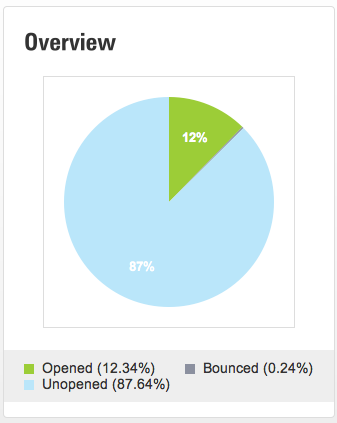
Opened – The number of unique people that opened an email at least once.  Even though they may have opened the email more than once they are still only counted once.
Unopened – The number of emails that were not opened.

Bounce – An email that was unable to be delivered because of an issue with the email address. i.e. bad email address, miss- spelled name, domain is expired etc…

Delivered – The number of emails that were delivered.

Total Opens – The total number of times the email has been viewed.  Each time the subscriber opens the email is counted.

Clicks – The total number of times a link in the email has been clicked.

Unique Clicks – The number of times links in the email have been clicked.  If a subscriber clicked on a link more than once it is only counted once.

Forwards – The total number of times that the email was forwarded using the “Forward” feature link in the email.

Opt Outs – The number of people that opted out/unsubscribed from your list using a the link in this campaign.

Feel free to contact us if we missed any terms.

Tagged , , ,

Facebook Page Webinar – Next Week


Real Estate Marketing WebinarOn Thursday December 15, 2011 we will be hosting two free Webinars. The first session will be an introduction to the Digital Home Info Real Estate Marketing system. The second is Setting up a Facebook Page. Registration info is below.

Thursday, December 15, 2011

Introduction to Digital Home Info 1:00 PM – 1:30 PM EST Click Here to Register

This session is an introduction to Digital Home Info.  The session will be about 30 minutes long. We will cover the features and benefits of the Digital Home Info Real Estate Marketing system.

Setting up a Facebook Page 2:00 PM – 3:00 PM EST Click Here to Register

This session is a tutorial on how to setup a Facebook Page.  We will cover the steps required to setup a page, provide tips and tricks on promoting your page, and content generation.

Tagged , , ,

Facebook Real Estate Integration

FacebookWe just updated the way that Digital Home Info integrates with Facebook. The changes include:

  • Easier set up of “Listing of the Day” status updates
  • Publish “Listing of the Day” to multiple Facebook Pages
  • Install “My Listings” tab on multiple Facebook Pages

 Here’s how to setup the “Listing of the Day” feature.  (You must do this to before you setup a “My Listings” tab.)

  1. Click on the “Account Info” tab in the Dashboard.
  2. Select the “Social Media Settings” tab on the Account Info page.
  3. Click on the “Click here to authorize Digital Home Info access to your Facebook account” link.
  4. Click on the “Login to Facebook” link.
  5. Click on the “Allow” button on the “Request for Permission” page.
  6. Check the box next to each Facebook page that you want to push the “Listing of the Day” to and press the “Save” button at the bottom of the screen.
  7. When the page refreshes the Facebook pages you selected will be listed with checkboxes for each day of the week next to them.  Select the desired days and press the “Save” button next to the Facebook page.

To setup the “My Listings” tab:

  1. Goto http://www.facebook.com/apps/application.php?id=258943535455
  2. In the bottom left section of the page you will find an “Add to My Page” link. Click on it.
  3. Select the page that you want to add this application to and press the “Add to Page”.
  4. At this point the application has been added to your page. You may add it to as many pages as you like as long as the page is authorized above.
Please feel free to contact us if you have any questions or need assistance in setting up your account.

Tagged , , ,

How Many Referrals Do You Get?

I probably see or hear hundreds of subtle requests for referrals from agents on a daily basis.  I see them in emails, on voicemails, in signature blocks, and on business cards.  While I’ve seen some clever ones, most are one of a few standard cookie cutter messages.  I’ve been asked a number of times for recommendations for a good realtor followed by a statement as to what the person is looking for (experts in a particular geographical area or someone good with helping first time home buyers etc.) I’ve never once been asked if I know of a good real estate agent who is “not too busy” to sell their home or help them find a new one.  For this reason alone, I struggle with the popularity of this quote as a means to encourage referrals.  Imagine another industry using a similar quote, “I’m never too busy to sell office products to your friends and family”.  Sounds odd, does it not?

So, what makes you stand out and helps people not only remember that you are a realtor but one that they would feel confident sending their friends, colleagues and family to?  Below are just a few things (aside from providing great customer service to clients) that I have noted in agents getting a lot of referrals.

-The agent has a focus and shows expertise in that area.  Maybe you love selling or helping buyers find a home in a particular area, or you are a condo king or focus mainly on short sales or new construction.  Customize your referral tagline and marketing to include your ideal client.

-They are not all business all the time.  Is your business facebook page or blog just full of listings?  Is your “about me” section on your website nonexistent or filled with just who you are as a realtor?  Give people things that they can relate to.  Show them your character-be genuine.  You might be surprised what people will remember from your “about you” section.  Even with a referral, there is a good chance that potential clients will try to learn more about you online before reaching out to you.

-They keep in touch…often.  A branded monthly email is a great way to stay top of mind with your contacts.  Personal one on one follow up is important too-such as a call after a sale, a personal note or a request to have coffee or lunch.  When is the last time you reached out to a past client?  Do you remember your clients from 3 years ago?  If not, chances are they won’t remember you.

-They don’t seem desperate.   The housing market has been tough in recent years and while you may take any client you can get your hands on, promoting that is not a good idea.  On more than one occasion, I have had an agent ask me within minutes of meeting me whether I knew of anyone looking to buy or sell a house.  Complete turnoff.

-They are involved in their community.  Showcase your leadership and marketing skills by participating in a group that interests you.  Whether it’s a club, your church, a charity, or a hobby-take an active role and let people get to know you.

Have other tips for gaining referrals? Let us know!

Tagged , , ,

How to Create a Real Estate Email Marketing Campaign

Email Marketing is an important part of any Real Estate Marketing Plan and one of the features included in the Digital Home Info Real Estate Marketing Platform.  Many of our customers are eager to get started using this great feature but aren’t quite sure where to get started.  So we created this tutorial to show you how to create an Email Marketing Campaign using the Digital Home Info system.

1) Once Logged in to the Digital Home Info Portal hover over the “Email Marketing” tab in the top navigation bar.

Real Estate Email Marketing

2) Click on the “New Campaign” link in the drop down menu.

3) Select an Email Subscriber List from the available lists.  Press the “Next” button at the bottom of the screen. (Don’t have a list created yet? Click here to create an email marketing list)

Real Estate Email List

4) Enter a Campaign Name, Subject Line and Select a Date and Time to deliver the email.  Press the “Next” button to go to the template selection screen.

Real Estate Email Campaign

5) Select an Email Template to use.  You can select from the provided templates or add a custom template and use it.  Press the “Next” button to go to the Email Editor.

Real Estate Email Template

6) Edit the default content in the email template by typing over it or using the photo gallery to add your images.  Click on the “Next” button to go to the “Text Only” version of your email.

Real Estate Marketing Email

7) This is a “Text Only” version of your email.  It is for email clients that do not show html email.  The text only version includes all of the content in the html email and tries to format it in an easy to read format. When you are done editing this press the “Next” button to go to the Campaign Review page.

Real Estate Marketing Email

8) On the Campaign Review Page you can review the settings for this campaign.  Click on the “Edit” button next to each section in order to change the information.  You can also preview the HTML and Text versions of the email by pressing the “Preview” button.  Enter an email address to send a test/preview of the email. You must send a test/preview email before being allowed to actually schedule the email.

Real Estate Email Marketing Preview

9) Once you have reviewed the test/preview email you press the “Schedule Email” button to send your email. Once an email is scheduled it may be modified from the “Pending” section at any time up until it is actually delivered.

Real Estate Marketing Email Review

Feel free to let us know if you have any questions.


Tagged , ,

Setting up a Facebook Page Webinar


Real Estate Marketing WebinarOn Thursday December 15, 2011 we will be hosting two free Webinars. The first session will be an introduction to the Digital Home Info Real Estate Marketing system. The second is Setting up a Facebook Page. Registration info is below.

Thursday, December 15, 2011

Introduction to Digital Home Info 1:00 PM – 1:30 PM EST Click Here to Register

This session is an introduction to Digital Home Info.  The session will be about 30 minutes long. We will cover the features and benefits of the Digital Home Info Real Estate Marketing system.

Setting up a Facebook Page 2:00 PM – 3:00 PM EST Click Here to Register

This session is a tutorial on how to setup a Facebook Page.  We will cover the steps required to setup a page, provide tips and tricks on promoting your page, and content generation.

Tagged , , ,

3 Reasons REALTORS ® should use YouTube

YouTube LogoWhy would REALTORS ® want to setup a YouTube channel? We get this question every week or so (usually when we are talking about our Real Estate Video feature) so we thought we would share our answer:

1) YouTube is the second largest search engine: this means that after Google people go to YouTube to find answers and help. If you don’t have a video presence, you just cut yourself out of the world’s second largest search engine.

2) 50% of YouTube users make more than $50k per year: Half of YouTube users make enough money to afford a decent home in most markets. Combine this with number one above and these users are going to turn to YouTube to search for their next home.

3) 64% of YouTube users are between 25 and 64 years of age: More than half of YouTube’s users fall into the most active home buying demographics. From first time home buyers all the way up to empty nesters looking to sell their current home and downsize.

Bonus – An autoshared tweet will result in 6 new YouTube sessions: YouTube has a nice “autoshare” feature that will automatically push your video links to Twitter and Facebook. Each of these autoshared tweets results in 6 new YouTube sessions. Meaning that there is an opportunity to get your video message in front of more people. To learn more about autoshare click here: http://www.google.com/support/youtube/bin/answer.py?answer=157215

Data provided by One Lily Creative Agency and SocialMediaSonar.com

Tagged , , , ,

Infographic: How to Grow Your Twitter Following | Marketing Technology Blog

Tagged , , , ,

Real Estate SEO Tip

Real Estate SEO (Search Engine Optimization) tip for REALTORS©

Real Estate SEO

Photo Courtesy of Paloma Gómez via Flickr

Many broker offices have a web site.  That web site usually provides a profile page for their real estate agents.  Often agents will set these profile pages to automatically redirect the browser to the agents web site.  This is good for getting the viewer directly to the agents site.  But some agents might be missing out on a great Real Estate SEO opportunity.  Instead of redirecting the browser the agent could fill in the bio information and include a link back to their website. Readmore…
Tagged , ,
Page 1 of 212