Real Estate Marketing

Digital Home Info Enhancements

Digital Home Info - Real Estate Marketing PlatformOver the last month we have made a number of small enhancements to Digital Home Info.  These enhancements include:

  • Music on the YouTube Real Estate Videos – If you have selected a music file to play on your Virtual Tour then the music will now be included in the YouTube video that we generate.
  •  
  • Panoramic photos are now included in the YouTube Real Estate Videos – Our YouTube videos will now scan panoramic from right to left.
  •  
  • Email Photo Uploading – We have made the process of uploading and inserting photos into an email easier.  The process now directly inserts the photo into the email instead of having to drag and drop it from the gallery on the right side of the screen.
  •  
  • Email Photo Gallery – You select photos from your photo gallery and insert them directly into the email at full size instead of having to resize them once they are inserted.
  •  
  • Photo Trim – Sometimes photos imported from an IDX feed will have whitespace on the edges, especially if it is a vertical photo.  This whitespace just doesn’t look right so we have placed a “Trim” link under each photo that will replace the whitespace with black space.  This looks much better in the Virtual Tour.

If you haven’t yet had a chance, check out these enhancements and let us know what you think.

*NOTE – music has not been added to existing videos.  To rebuild your video for existing listings rearrange the order of your listing photos in the gallery (make sure to restore the desired order).

Tagged , , ,

Neighborhood Blogs Offer New Way to Reach Buyers

Tagged ,

Fed Leaves Rate Alone, More Upbeat About Recovery

Tagged ,

Virtual Tour Features – New Small Photo Virtual Tour and Image Trimming

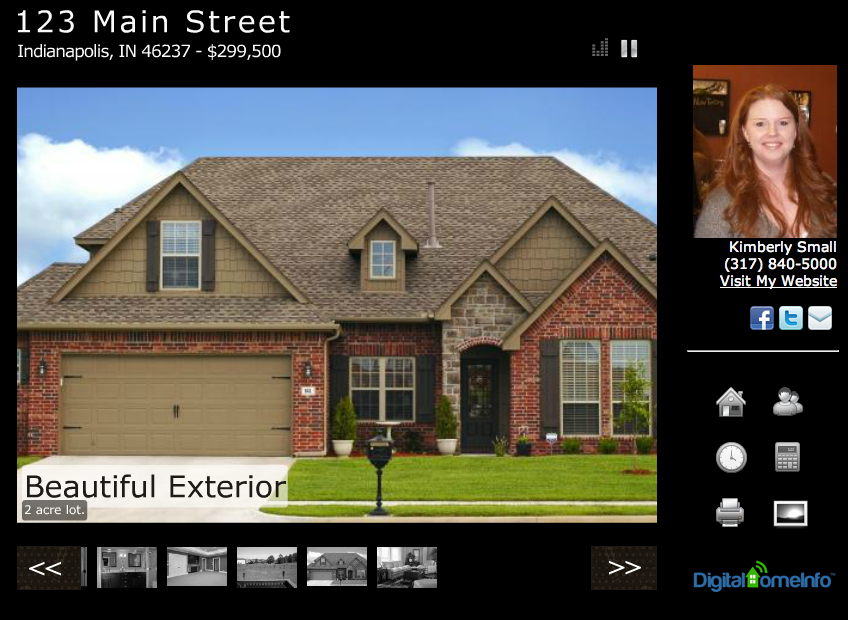
Real Estate Virtual TourAs part of our ongoing efforts to enhance and improve the Digital Home Info Real Estate Marketing Platform we have recently released a few new features.  A new small sized virtual tour that is ideal for displaying small images and auto-trim and correct photo processing. The new small virtual tour has all of the same features as our larger animated virtual tour (Home Information, Google Maps, Mortgage Calculator, Appointment Scheduler, Auto-generated PDF Flyer, and photo browser) it is just optimized for smaller files sizes.  We have noticed that many of our agents use photos from their local IDX system and that these photos tend to be around 640px by 480px.  Although these looked good in the larger virtual tour, sometimes you could tell that a photo had been stretched to make it fit right.  So we created this version to match the need.  If you upload your own photos or your photos are large you can still use the larger virtual tour. We just wanted to provide another option so that you can get the most out of our service. Something else we noticed with the IDX photos was that they sometimes contained whitespace (borders) around the edges.  So we set out to find a way to remove the whitespace without altering the photo.  This is where Auto Trim comes into the picture. Now you can simply click on the “Trim” link under each photo in your gallery and Digital Home Info will automatically remove the whitespace. This greatly improves the presentation of the virtual tour since the white is no longer there to detract from the overall presentation. We will be blogging how to’s on both of these new features in the coming days so look for those soon.  If you have any suggestions or comments please let us know.
Tagged , ,

New-Home Sales Post Biggest Gains in Months | Realtor Magazine

New-home sales for single-family homes rose 1.3 percent in October, marking the best pace for new-home sales activity since this May, the U.S. Commerce Department reports. Following the sector’s worst year for new-home activity on record last year, several recent reports are suggesting a pick-up in new construction.
Tagged

Home Values Flat in Third Quarter on Slow Road to Housing Market Bottom

Tagged , ,

QR Codes for Real Estate

QR Codes for Real EstateDigital Home Info has integrated QR Codes into its Real Estate Marketing platform.  In addition to being available for immediate download and use in other marketing media we have integrated QR Codes into the new Virtual Tour flyers and will be adding them to signs and riders.
  • QR Code for every Listing - Every listing has a QR Code ready for download in the dashboard.  The QR Code links directly to the Mobile Virtual Tour for the Listing.
  • QR Code for Mobile Real Estate Agent Website - Every Digital Home Info customer gets a Mobile Real Estate Agent Website.  We provide a QR Code that links directly to to this mobile optimized site.
  • Downloadable - Every QR Code is downloadable in a large format.
We are excited and pleased about this latest release.  Please feel free to contact us if you have any questions.
Tagged , , ,

How to edit my Profile Information

Below is a quick video tutorial on how to edit your profile information in the Digital Home Info Real Estate Marketing platform.
Tagged

Virtual Tours: 3 Tips for Enhancing Your Photos

Virtual Tours are an important part of any Real Estate Marketing Platform.  Virtual tours can also be the first exposure that a potential buyer has to a listing.  This is why it is important for your virtual tour to look great.  Below are three tips to help you enhance your virtual tours.
  • Upload large photos – many agents will simply download photos from their listing system and import them into a virtual tour system.  The problem with this is that many listing systems resize the original photos and they end up extremely small.  At a minimum your photos should be 640px wide and 480px high.  For the Digital Home Info system the optimal size of a photo is 1280px wide by 1024px high (unless you are using panoramic images).  Images of this size will display very well in both the Animated and Full Screen virtual tours.
  • Over saturate photos – Over saturating a photo is a process that makes colors seem brighter.  In the Digital Home Info gallery there is a photo editor that will allow you to adjust the saturation of a photo.  We have found that over saturating a photo by about 10% will cause the colors in most photos to appear much brighter without distorting the overall image.
  • Number of photos – A prospective buyer is viewing a virtual tour for one reason.  They are trying to determine if the listing is worth the effort of viewing in person.  We have seen instances where agents upload 40, 50 or more photos to a virtual tour.  While it is a great a way to show every aspect of the home it also allows a buyer to see things that might be on the “Deal Breaker” list.  Things like a rough patch in a basement floor or really close neighboring homes.  These are things that in person may not be as much of an issue but cause the buyer to pass before they ever see the listing in person.  We recommend somewhere between 12 and 24 photos as the optimal number.  This allows you to showcase the listing and leave a little mystery for the buyer to see when they get there.
Tagged ,

Why REALTORS® should be blogging

Why REALTORS® should be bloggingHow many emails have you received in the last year from companies claiming to be able to rank your site on the first page of Google?  There are a number of reputable companies out there who can and do improve your rankings, but it can be very expensive.  There are also a lot of companies making promises that they don’t deliver on.  Blogging is a great way to help your site be found.  Here are a few tips to help you be successful at blogging:
  1. Blog regularly- You don’t have to do a blog post every day, but you should do at least 1-3 per week.  Blogging once a month (quarter or year) will not be beneficial.  Schedule time to blog just like you would a meeting.  It’s very easy for blogging to fall to the bottom of your list if you don’t plan to do it.  Set a goal and stick to it.
  1. Create a list-  A lot of agents struggle to find topics to blog about.  Dedicate some time to brainstorm topics that you can use or create a plan to do different types of posts each week.  For example, you can plan to do 2 posts per week.  One would be about a real estate topic (Moving tips, Finding your first home, Downsizing, a highlight of a new listing or an Open House).  The second could be about something going on in your community.  Just a couple weeks ago, I searched for a haunted house in a particular area and found myself reading a realtor’s blog.  They had visited a few, provided feedback and provided a link to discount coupons.  What’s going on in the neighborhoods where you work?
  1. Why pick you as a realtor?-  A blog is a great way to establish expertise and help potential clients pick you.  Show you know your business and the areas in which you are working.
Want more tips for blogging?  Click here to sign up for our free Real Estate Blogging for SEO webinar on Thursday November 10th.
Tagged , ,
Page 1 of 512345